Features›Estimates
Estimates
Turn any work order into a professional, itemized estimate with one voice command. Send it to the customer right from the app.
Voice Enabled
Generating an Estimate
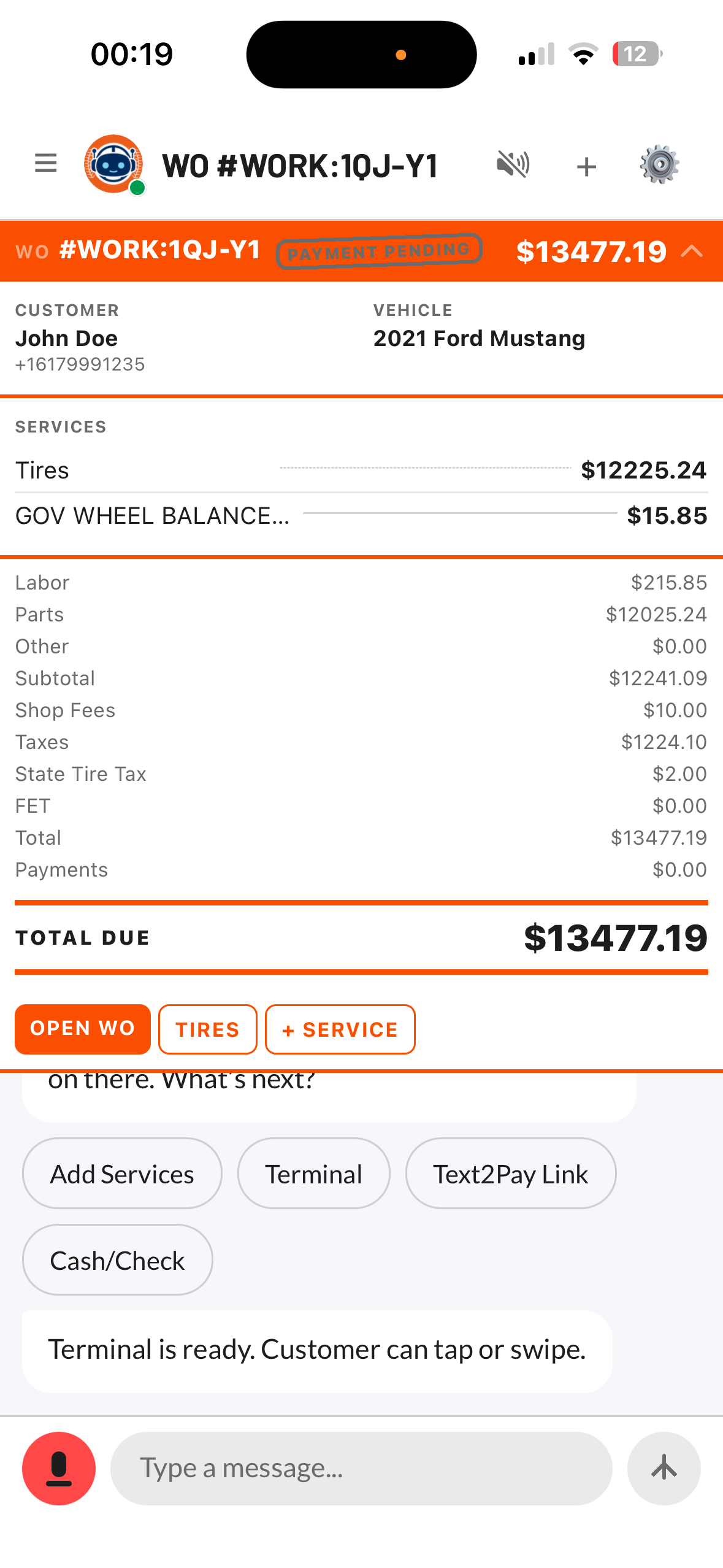
Once you have a work order with tires, services, or labor items, tell Tuty to generate an estimate. Tuty calculates the total including parts, labor, and any applicable fees, then presents it as a clean summary you can review.
“Generate an estimate for this work order”
“Create an estimate”
“How much will this work order cost?”
What's Included
Every estimate Tuty generates includes a detailed breakdown so your customer knows exactly what they're paying for.
- Tire prices with brand, model, and size
- Service and labor line items
- Quantities and per-unit pricing
- Subtotal, fees, and grand total
- Customer and vehicle information
Sending Estimates
After reviewing the estimate, you can send it directly to the customer. Tuty sends the estimate as a link, so the customer can view and approve it from their phone.
“Send the estimate to the customer”
“Text this estimate to the customer”
✅
Estimates update automatically. If you add or remove items from the work order, just generate a new estimate and it reflects the latest changes.